

List of result statuses
A completed Pulse test will have one of the following four statuses:Valid
The test completed successfully.
Valid with warnings
The test completed with warnings, such as low or high building pressurisation.
In excess of
The test was not valid due to insufficient building pressurisation, but it is still possible to present an “in excess of” result.
Invalid
The test was not valid and a result cannot be presented with any confidence.
Why does my test have warnings?
A test status warning is given where the achieved pressure range does not span 4 Pa. This does not invalidate the test but means that the result at 4 Pa has had to be inferred based on the available data. This is then reflected in the calculation uncertainty. Where these instances occur, the closer the achieved pressure range is to 4 Pa, the better.Low achieved pressure
A “low achieved pressure” warning happens when the building pressurisation fails to reach at least 4 Pa (see red line below). This is as a result of the building under test being either too big and or too leaky for the number of air receivers used or the initial charge level they were set to. To increase the achieved pressure, you should use additional air receivers or set the initial charge level to the maximum 10 bar available.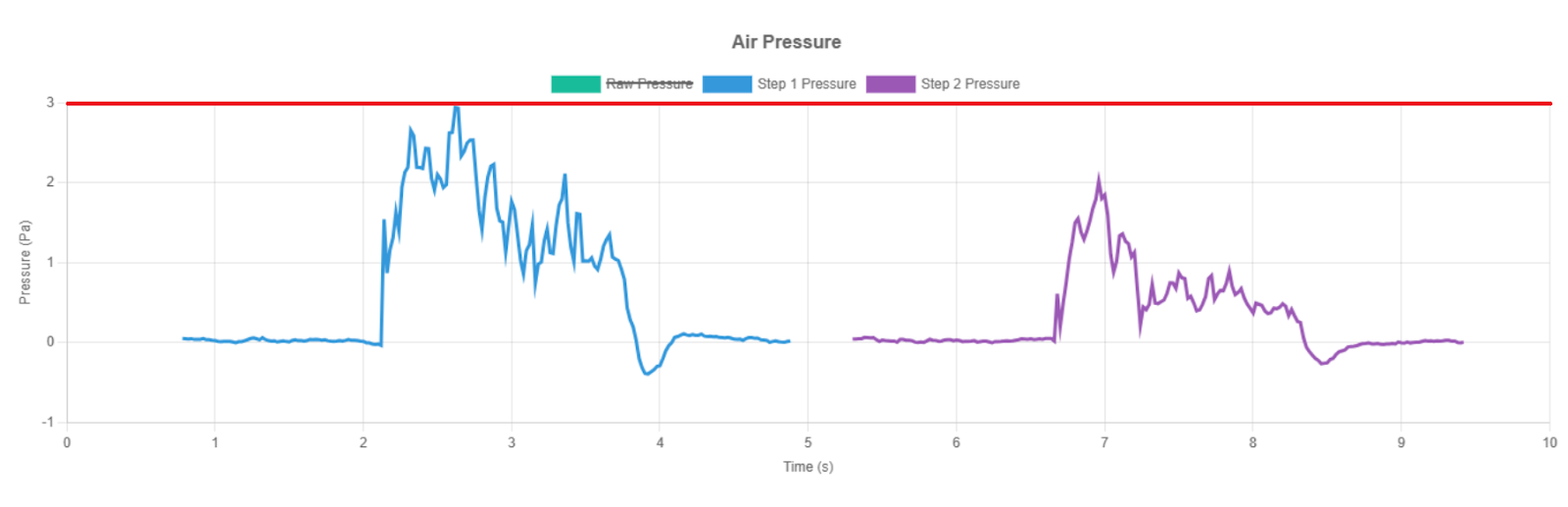
High achieved pressure
A “high achieved pressure” warning happens when the test cycle entirely exceeds 4 Pa and never drops below it (see red line below). This is as a result of releasing too much air into the building under test, either by using too many air receivers or too high a initial charge level. In these instances, you could use fewer air receivers and/or carry out the test from a lower air receiver charge level, i.e. less than 10 bar.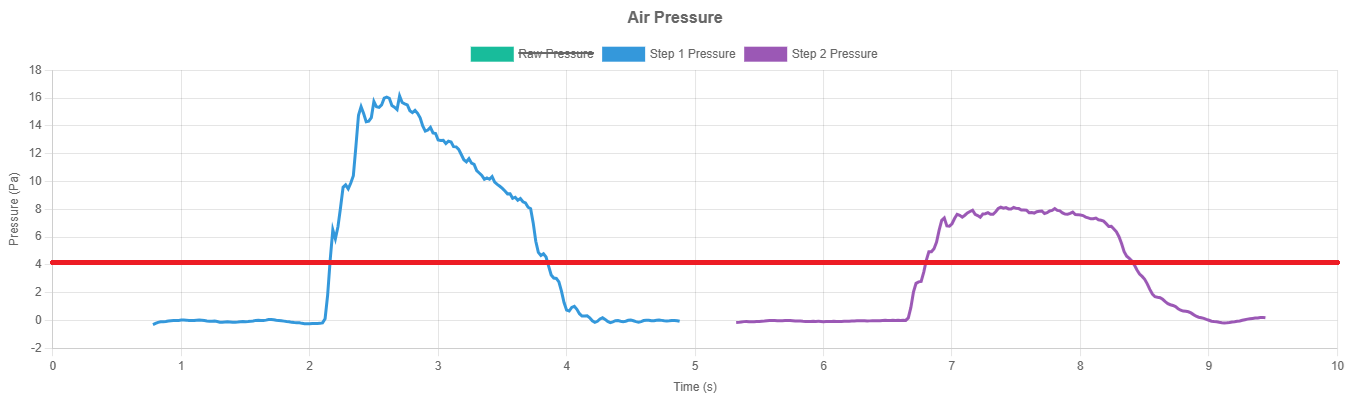
What is an “In excess of” test?
Results that present as “In excess of” mean that insufficient building presurisation was reached to achieve a valid result. However, using the data that was collected, it is possible to know that the air permeability and leakage of the building exceeds the result presented.Why was my test invalid?
There are several criteria and validation checks used to ensure that Pulse test results are accurate and dependable. As a Pulse test cycle consists of several steps, the best possible combination of steps will be selected to determine the result metrics. However, the are times when all possible combinations of steps will fail to produce a valid result. In these instances, the result will be presented as invalid and the reasons for the test failing will displayed on screen. The failure reasons and possible actions that may be taken are detailed below:Invalid R² threshold
The coefficient of determination is indicative of the accuracy with which a curve fitting equation can be applied to a set of results. With high frequency 50Hz data collection, 25 reference points are collected per step and it is recommended that an overall R² value of greater than 0.96 is required for a test to be deemed valid. Where all combinations of the test steps are analysed yet none are able to achieve the minimum 0.96 threshold, the test is flagged as invalid. The quality of the data points and trendline can be viewed in the ‘Air Flow’ chart of the View Test page, with poor R² tests typically presenting a distorted series of data points. These distortions will typically be as a result of either:- adverse environmental conditions e.g. strong gusting winds;
- poor test conditions e.g. a loose or moving element of the building fabric that is constantly moving and changing or reacting to the Pulse of air inconsistently;
- sub-standard test setup e.g. distorted air flow and reverberations as a result of the air receiver or controller being too close to a wall or window.